Showing posts with label pdb. Show all posts

Monday, December 16, 2013

Multitenant Self-Service Provisioning - BETA 2 - No emails out for ADMIN user

What did I mean? Actually, I thought how to rename "ADMIN" user?or How to rename "Email Address" on  Multitenant Self-Service Provisioning? Why I interested in it?

I created New Database by using "ADMIN" user.
I didn't get email about credentials (Because no email address for ADMIN user). So, I didn't know about PDB_ADMIN password for this PDB.

Then,I tested creating New Database with other users.

Other users, they are email address. When I used them to create New Database on Multitenant Self-Service Provisioning. Email was sent to users for credentials.
Example Email:
In emails, users should see credentials about PDB_ADMIN schema (Database Schema Credential) and 
ADMIN (APEX Credential).

So, Users should use other users to create Database (PDB) and users should be email address (real email addresses).
Note: Don't miss to set Server be able to send email out.

Related Posts:
Multitenant Self-Service Provisioning - BETA 2 - Started to play
Multitenant Self-Service Provisioning - BETA 2 - Role
Multitenant Self-Service Provisioning - BETA 2 - Connect SQL Developer with pdb_admin


Sunday, December 15, 2013

Multitenant Self-Service Provisioning - BETA 2 - Connect SQL Developer with pdb_admin

I didn't write about setting SQL Developer to connect PDB. I just tested connection by using SQL Developer with pdb_admin. As you know - The PDB_ADMIN user in newly created PDBs has SYSDBA system privilege so it can fully manage the PDB.
SQL> conn / as sysdba
Connected.
SQL> alter session set container=pdb1;

Session altered.

SQL> alter user pdb_admin identified by password;

User altered.

SQL> connect pdb_admin/password@test12c/pdb1
Connected.
SQL> show user;
USER is "PDB_ADMIN"
SQL>
How to connect "pdb1" through SQL Developer? Set it on SQL Developer?... Actually Users can download xml file on  Multitenant Self-Service Provisioning web.
After downloaded, A User import xml file on SQL Developer as example.


Now! pdb_admin user is able to connect PDB1 through SQL Developer.

Related Posts:
Multitenant Self-Service Provisioning - BETA 2 - Started to play
Multitenant Self-Service Provisioning - BETA 2 - Role

Multitenant Self-Service Provisioning - BETA 2 - Role

Last post, I posted about Oracle Multitenant Self-Service Provisioning - BETA 2 and read more about what changes have been made in this Beta 2 release.
Users with the PDBA role in the Oracle Multitenant Self-Service Provisioning application can only view PDBs that they created or have been made an administrator of. Because of this, the "Privileges" filter is not displayed. Users with the CDBA role will still see all PDBs as well as the "Privileges" filter.
So, I added New User with Pluggable Database Administrator (PDBA), then logged in with New User and added New Database (PDB2). So, I only found what PDB, that New User created.

After checking more, I changed role to be Container Database Administrator (CDBA) on New User and re-logged in again.
Related Post:
Multitenant Self-Service Provisioning - BETA 2 - Started to play

Multitenant Self-Service Provisioning - BETA 2 - Started to play

Got news on tweeter about Multitenant Self-Service Provisioning - BETA 2. It's very interesting. You will find something change. For example On Oracle Multitenant Self Service Provisioning - BETA 1 runs in APEX pdb.
(Downloaded pdbss_1030.zip and installed)
This version, the Oracle Multitenant Self-Service Provisioning application now runs in CDB$ROOT instead of a PDB.
SQL> show con_name

CON_NAME
------------------------------
CDB$ROOT

SQL> select name, open_mode from v$pdbs;

NAME                           OPEN_MODE
------------------------------ ----------
PDB$SEED                       READ ONLY

... some.. The PDB_ADMIN user in newly created PDBs has SYSDBA system privilege so it can fully manage the PDB.
SQL> select con_id, name, open_mode from v$pdbs;

    CON_ID NAME                           OPEN_MODE
---------- ------------------------------ ----------
         2 PDB$SEED                       READ ONLY

SQL> select con_id, username from cdb_users where username ='PDB_ADMIN';

no rows selected
*** Created PDB ***
SQL>  select name, open_mode from v$pdbs;
NAME                           OPEN_MODE
------------------------------ ----------
PDB$SEED                       READ ONLY
PDB1                           READ WRITE
SQL> select con_id, username from cdb_users where username ='PDB_ADMIN';

    CON_ID USERNAME
---------- ---------------------------------------------------
         3 PDB_ADMIN
Oops!
SQL> SELECT * FROM V$PWFILE_USERS;

USERNAME                       SYSDB SYSOP SYSAS SYSBA SYSDG SYSKM     CON_ID
------------------------------ ----- ----- ----- ----- ----- ----- ----------
SYS                            TRUE  TRUE  FALSE FALSE FALSE FALSE          0
SYSDG                          FALSE FALSE FALSE FALSE TRUE  FALSE          1
SYSBACKUP                      FALSE FALSE FALSE TRUE  FALSE FALSE          1
SYSKM                          FALSE FALSE FALSE FALSE FALSE TRUE           1
C##PDBMGR                      TRUE  FALSE FALSE FALSE FALSE FALSE          0
PDB_ADMIN                      TRUE  FALSE FALSE FALSE FALSE FALSE          3

6 rows selected.

Wednesday, September 25, 2013

Multitenant Self-Service Provisioning - Database Sizes

Why I try to post about Database Sizes on Oracle Multitenant Self-Service Provisioning. When I create New Database(PDB), I want other Maximum Storage sizes.
My idea is 500 GB and 2 TB... How to do? On "Self-Service Administration" - First, select "Self-Service System Configuration". Then select "Database Sizes".


Then, select "Add Size" and fill in...  After "Add Size Option"... It should show new size option.
Note: I added "500 GB" and "2 TB".
Go back to "New Database(PDB)"... It displayed "500 GB", but not display "2 TB"... Why?

OK... Go to "Self-Service Quotas" and changed something.
Changed "Storage Maximum in GB" from "1024" to "2048"
Go back to "New Database(PDB)" again!
Wow! Able to choose "2 TB".

Related Posts:
Multitenant Self-Service Provisioning (BETA) - Database 12c
Multitenant Self-Service Provisioning - Clone PDB
Multitenant Self-Service Provisioning - Close/Open PDB
Multitenant Self-Service Provisioning - Unplug/Plug In PDB
Multitenant Self-Service Provisioning - Drop PDB
Multitenant Self-Service Provisioning - Request an Account
Multitenant Self-Service Provisioning - Notifications


Multitenant Self-Service Provisioning - Notifications

A user can create notifications on Oracle Multitenant Self-Service Provisioning page. Notifications are displayed on the home page of this self-service application to communicate with users of this self-service system. Notifications are managed by application administrators but viewable by all users.
First, select "Administration", then select "Notifications".

Then, select "Add Notification" and fill in...
Finally, select "Create Notification" for creating.
After that, go Home and check!
Tried to use other accounts. It's all right... Found notification.

Related Posts:
Multitenant Self-Service Provisioning (BETA) - Database 12c
Multitenant Self-Service Provisioning - Clone PDB
Multitenant Self-Service Provisioning - Close/Open PDB
Multitenant Self-Service Provisioning - Unplug/Plug In PDB
Multitenant Self-Service Provisioning - Drop PDB
Multitenant Self-Service Provisioning - Request an Account

Tuesday, September 24, 2013

Multitenant Self-Service Provisioning - Request an Account

On Oracle Multitenant Self-Service Provisioning page."Request an Account", I thought that's very interesting for testing how it work.
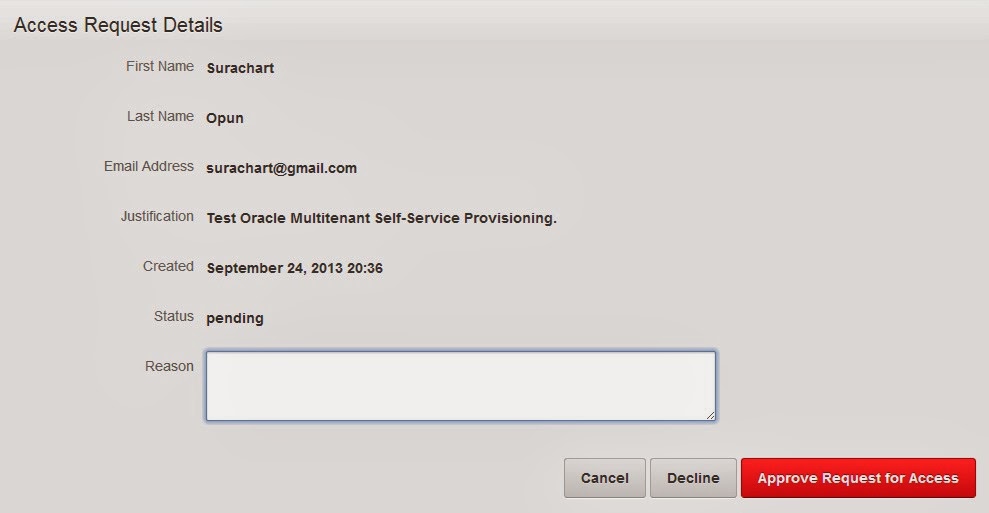
Select "Request an Account" and Fill in as below picture(Please fill in available email).


Note: User are created by "Request an Account". They have Pluggable Database Administrator (PDBA) role.
- CDBAs have full access to all aspects of this self-service system.
- PDBAs can create Pluggable Databases but not perform administrative functions.

After requesting, ADMIN can check on "Self-Service Administration".


After approving... A user should receives email (Username/Password).
Example:
Then a user click Link in email, then login!


A New Account can create/perform PDBs (they are provided as ADMIN) and not perform administrative functions. As below picture, new user can clone/close/reopen/unplug/drop "OPUNPDB" pdb, but can not on "TESTPDB" pdb.

Related Posts:
Multitenant Self-Service Provisioning (BETA) - Database 12c
Multitenant Self-Service Provisioning - Clone PDB
Multitenant Self-Service Provisioning - Close/Open PDB
Multitenant Self-Service Provisioning - Unplug/Plug In PDB
Multitenant Self-Service Provisioning - Drop PDB

Multitenant Self-Service Provisioning - Close/Open PDB

Just wanna test about Oracle Multitenant Self-Service Provisioning again. In this post, I wanted to test closing/reopening PDB. Previous post, I tested cloning PDB and some PDB (TESTPDB01) status = "READ ONLY.
Selected "Close/Reopen". Found below picture
It shows... Users can reopen as "READ WRITE" or "Close PDB"... Tested with "Close PDB".

PDB status = "Mounted", then tested "Open" as "Read Write".


PDB status = "Read Write". So, that means it's all right for Close/Open PDB on Oracle Multitenant Self-Service Provisioning.

Related Posts:
Multitenant Self-Service Provisioning (BETA) - Database 12c
Multitenant Self-Service Provisioning - Clone PDB

Multitenant Self-Service Provisioning - Clone PDB

Previous post, I wrote about Multitenant Self-Service Provisioning (BETA) - Database 12c. It's very useful.for learning PDB. After installatuon by using pdbss_ins.sql script, "APEX" pdb was created.
[oracle@test12c pdbss]$ grep "create pluggable database" *
pdbss_ins.sql:        'create pluggable database APEX admin user PDB_ADMIN identified by ' ||

SQL> connect / as sysdba
Connected.

SQL> select name, open_mode from v$pdbs;
NAME                           OPEN_MODE
------------------------------ ----------
PDB$SEED                       READ ONLY
APEX                           READ WRITE

SQL> alter session set container=APEX;

Session altered.

SQL> select tablespace_name, file_name from dba_data_files;

TABLESPACE_NAME      FILE_NAME
-------------------- ------------------------------------------------------------------------------------------------------------------------
SYSTEM               /u01/app/oracle/oradata/testcdb/TESTCDB/E71C92249E61151EE0436F6FA8C041D1/datafile/o1_mf_system_942fn5mw_.dbf
SYSAUX               /u01/app/oracle/oradata/testcdb/TESTCDB/E71C92249E61151EE0436F6FA8C041D1/datafile/o1_mf_sysaux_942fng96_.dbf

SQL> select tablespace_name, file_name from dba_temp_files;
TABLESPACE_NAME      FILE_NAME
-------------------- ------------------------------------------------------------------------------------------------------------------------
TEMP                 /u01/app/oracle/oradata/testcdb/TESTCDB/E71C92249E61151EE0436F6FA8C041D1/datafile/o1_mf_temp_942fob67_.dbf
Anyway, I didn't explain more what happened after using pdbss_ins.sql script. Readers can test and read it by themselves.
Previous post, I wrote about creating PDB. So, This post is about Cloning PDB (TESTPDB01).
SQL>  select name, open_mode from v$pdbs;

NAME                           OPEN_MODE
------------------------------ ----------
PDB$SEED                       READ ONLY
APEX                           READ WRITE
TESTPDB01                      READ WRITE
PDB status was "READ WRITE", Changed to "READ ONLY". When selected on "Clone".... It asked to change PDB status.


Selected "Clone" again, then found as below picture.


Now, CLONPDB pdb was created.
SQL> select name, open_mode from v$pdbs;

NAME                           OPEN_MODE
------------------------------ ----------
PDB$SEED                       READ ONLY
APEX                           READ WRITE
TESTPDB01                      READ ONLY
CLONEPDB                       READ WRITE
Related Posts
Multitenant Self-Service Provisioning (BETA) - Database 12c